 Draften
Start with a document. Keep control of every change.
Draften puts the writing surface first. You write, call on AI when it is useful, listen to the result and decide what belongs in the final draft.
1. Write in the document
Open a document and draft in the editor. Use paragraphs, headings and lists to shape the piece. Focus mode clears space around your writing; the command palette keeps common actions close to the keyboard. Documents are saved to your account and synced through Draften’s server so you can return to them.
If a connection drops while you edit, the browser keeps pending changes until it can send them. This is a recovery queue, not a local-only storage mode.
2. Ask for help on a passage
Select text when you want a rewrite, correction, shorter version, expansion or transition. Draften sends the text needed for that action to its AI provider when you invoke it. The assistant does not silently rewrite your document. Learn how the review step works on the AI editing page.
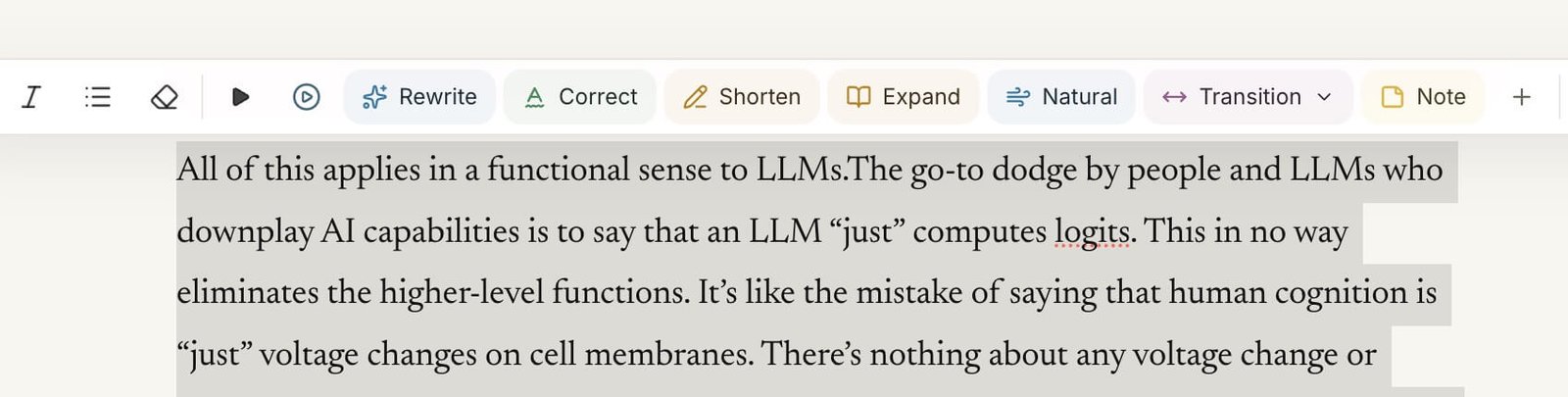
3. Hear the rhythm
Listen to a selection or the full draft to catch awkward phrasing, repetition and pacing that can hide on the page. Premium read-aloud voices can send the chosen passage to ElevenLabs; see privacy and data handling for details.
4. Review before accepting
Compare the original with a proposed edit, keep what works and revert what does not. Your document stays the center of the process. AI suggestions are a step in revision, not an automatic final answer.
What Draften is for
Draften is a web based word processor for writers who want one place to draft and revise, with AI available on request. The Free plan includes the editor, document sync and a daily allowance of AI assists. Read the current plan details before choosing how to use it.